What Are Crypto Wallet Approvals? A Beginner’s Guide to Permissions & Risks
Updated: October 2026
Written By
Table of Contents
- What Are Crypto Wallet Approvals?
- What Is the Difference Between Connecting, Signing and Approving?
- How Do Token Approvals Work?
- What Is an Unlimited Token Approval?
- Can a Smart Contract Spend Tokens After Approval?
- Are Crypto Wallet Approvals Dangerous?
- What Is a Permit Signature in Crypto?
- How Can You Check Existing Token Approvals?
- How Do You Revoke Crypto Wallet Approvals?
- Does Disconnecting a Wallet Revoke Approvals?
- The TMD Wallet Approval Check
- What Should You Check Before Approving a Wallet Request?
- Common Wallet Approval Red Flags
- Wallet Approval vs Wallet Security vs DeFi Safety
- Beginner Safety Note
- Beginner Wallet Approval Terms to Know
- Key Takeaways
- Where to Go Next
- Frequently Asked Questions
QUICK FACTS
Best for:
Crypto wallet and DeFi beginners
Difficulty: Beginner-friendly
Main topic:
Wallet approvals and permissions
Covers:
Token allowances, signatures, spending access, unlimited approvals and revocation
You’ll learn:
How to recognise different wallet requests, understand token permissions and review or remove approvals
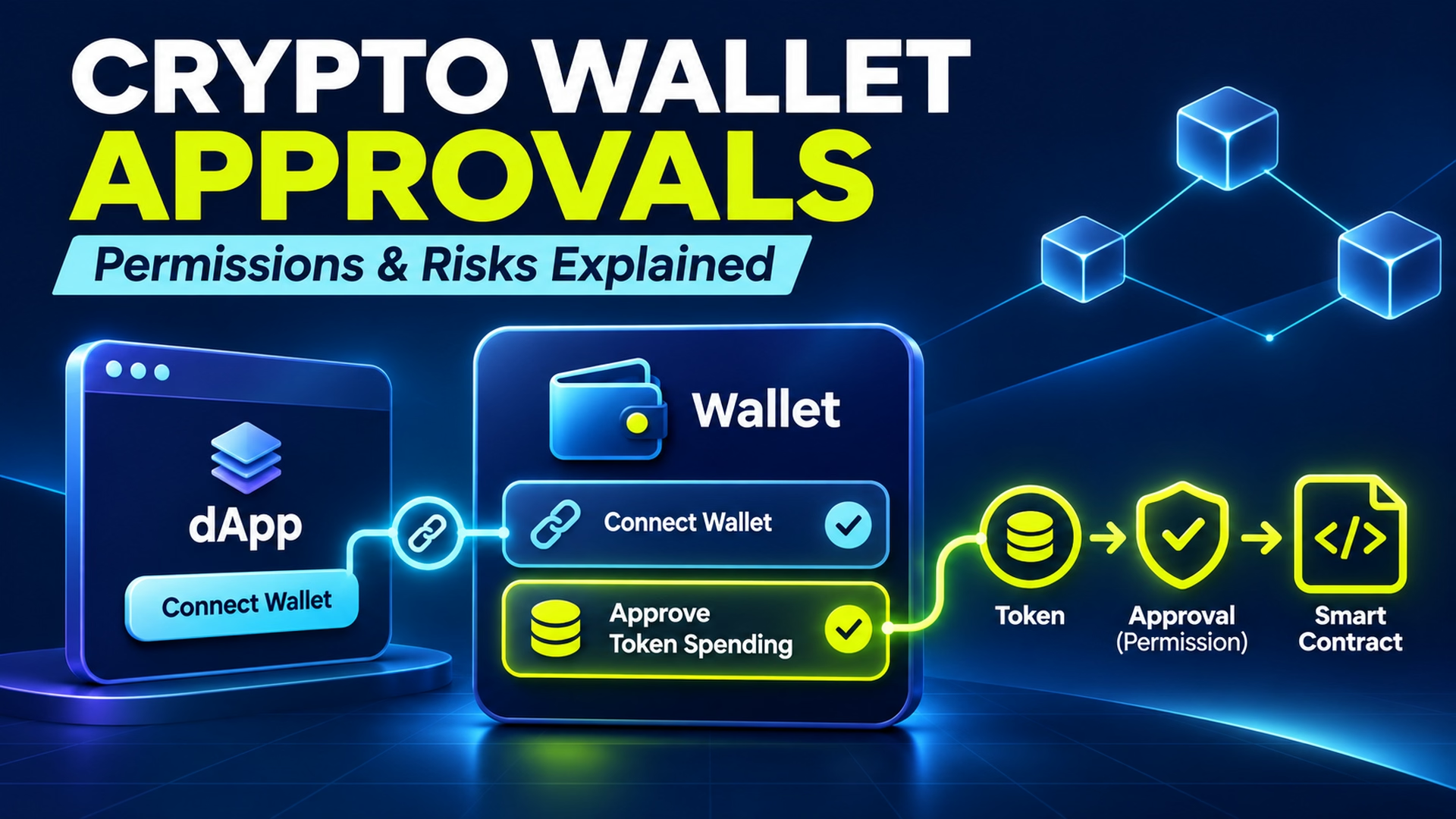
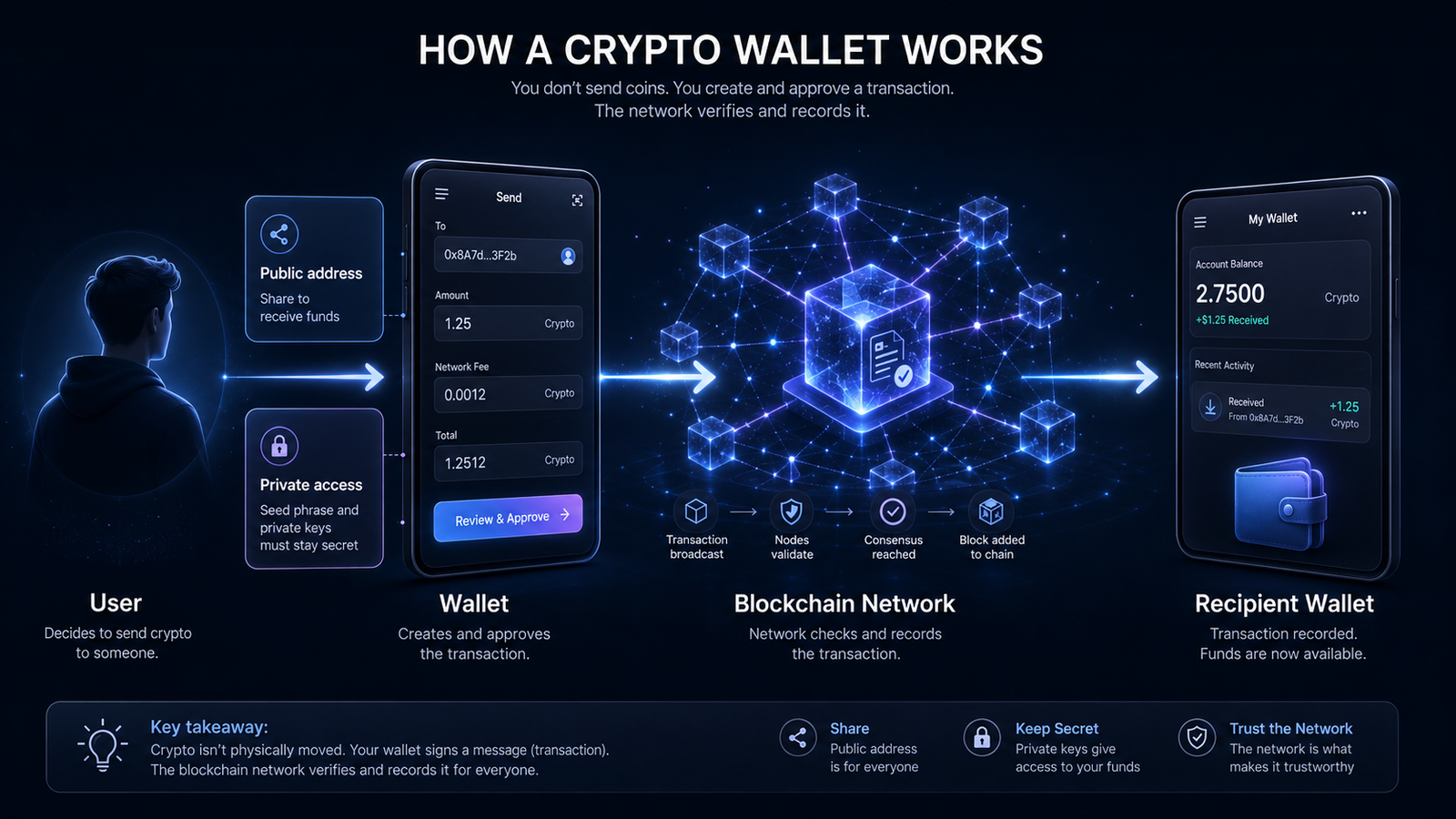
You connect your crypto wallet to a decentralised application (dApp), choose what you want to do and suddenly see a request to approve tokens or sign a message. What exactly are you authorising?
Wallet requests can look similar, but they do not always mean the same thing. Connecting a wallet, signing a message, approving token spending and confirming a transaction can each grant different kinds of access or permission.
Many approvals are a normal part of using crypto applications. However, granting more access than necessary, approving an unfamiliar contract or misunderstanding a signature can expose assets to risk, even when your private keys remain secure.
This beginner’s guide explains how crypto wallet approvals work, what token allowances mean, why unlimited permissions deserve attention and how to check or revoke existing approvals.
You’ll also learn how to distinguish different wallet requests using The TMD Wallet Approval Check, a practical 10-point framework for understanding permissions before authorising them.
What Are Crypto Wallet Approvals?
Crypto wallet approvals are permissions or authorisations users grant through their wallets when interacting with tokens, smart contracts or blockchain applications. The term can describe different actions, so it is important to distinguish token spending allowances from ordinary wallet connections and transaction signatures.
Quick Answer
A token approval gives a specified spender permission to use eligible tokens according to the token contract’s rules, usually up to an approved amount. It does not necessarily transfer tokens immediately or give the spender unrestricted access to everything in your wallet.
Crypto wallet approvals commonly appear when users interact with decentralised applications, swap tokens or deposit assets into DeFi protocols.
For example, a decentralised exchange may need permission to use the tokens involved in a swap. Depending on how the application operates, the wallet might first ask you to approve a spending allowance and then confirm a separate transaction.
Understanding the difference starts with knowing what a crypto wallet actually authorises when you click a button.
What Is the Difference Between Connecting, Signing and Approving?
Wallet interfaces may present several requests during a single interaction. Although they can appear one after another, they serve different purposes.
| Wallet action | What it generally does | Does it automatically allow token spending? |
|---|---|---|
| Connect wallet | Allows an application to interact with a wallet interface and access permitted account information | No |
| Sign a message | Produces a cryptographic signature associated with the wallet | Not ordinarily, but some signatures authorise permissions or other actions |
| Approve token allowance | Gives a specified spender permission under a token’s allowance rules | Yes, within the authorisation’s conditions |
| Sign a transaction | Authorises a blockchain transaction | Depends on the transaction |
| Revoke allowance | Changes or removes a particular existing token spending permission | Removes or reduces that allowance once effective |
The important question is not simply whether a request appears inside your wallet. It’s what the request allows to happen afterwards.
Connecting a Wallet
Connecting a wallet generally allows an application to interact with the wallet interface and access information such as an authorised account address.
The connection can help a dApp recognise the selected account and prepare requests for the user to review.
However, connecting does not automatically give the application permission to transfer every asset in that wallet.
Depending on the wallet and connection method, the application may still be able to observe public blockchain activity associated with the address.
Signing a Message
Signing a message uses the wallet’s cryptographic signing capability to demonstrate control of an account or authorise a particular message.
An ordinary authentication signature may be used to verify account ownership without directly transferring funds.
However, not every signature is harmless. Some structured messages can authorise token allowances or other actions under the relevant contract rules.
A wallet’s signing prompt should therefore be reviewed for its purpose and contents, rather than accepted simply because no immediate payment is displayed.
Approving Token Access
Approving token access means allowing a specified spender to use particular tokens under an applicable approval mechanism.
For common ERC-20 token approvals, the permission is associated with the token owner, token contract, spender address and approved allowance.
This is narrower than giving someone your private key, but it can still be financially significant.
Authorising a Transaction
A blockchain transaction is an instruction that may change the state of a network when executed.
Signing a transaction might authorise a token transfer, create an allowance, interact with a smart contract or perform another supported action.
The outcome depends on the transaction’s contents.
A request labelled as a transaction should not be assumed safe merely because it comes from an application the user has previously visited.
How Do Token Approvals Work?
Token approvals are particularly important for ERC-20 tokens on Ethereum and compatible networks.
In the standard allowance model, a token owner can permit another address to spend tokens on their behalf, within the applicable limit.
The authorised spender can then use the token contract’s supported functions to transfer eligible tokens according to that permission.
The Wallet Owner, Token and Spender
Three participants help explain the relationship:
- Wallet owner: The address holding the relevant tokens and granting permission.
- Token: The particular asset whose contract records or enforces the allowance.
- Spender: The address authorised to spend the tokens, often a smart contract.
Imagine a user wanting to exchange one token for another through a decentralised exchange.
The trading application may require permission for a designated contract to use the token being offered.
That permission concerns a particular token and spender. It does not automatically grant the spender access to unrelated assets.
What Is a Token Allowance?
A token allowance is the amount that a token contract permits an authorised spender to use on behalf of the owner.
For example, an allowance of 50 tokens generally authorises the spender to use up to that amount under the contract’s applicable rules.
The allowance is not the same as the current wallet balance. A permission may exceed the amount currently held, and unused permission may remain relevant if the wallet receives more of that token later.
An allowance also does not transfer ownership of the private keys or recovery phrase.
The token contract is responsible for enforcing the applicable spending rules.
What Happens After You Approve?
Once an on-chain approval has been confirmed, the relevant allowance becomes available under the token contract’s rules.
An authorised spender may then be able to use the permitted tokens without requesting a new signature from the owner for every subsequent spending action.
This is why approval requests deserve attention even when no tokens leave the wallet immediately.
Illustrative example
Suppose your wallet holds 100 units of Token A.
You approve a spending allowance of 25 Token A for a particular smart contract.
The contract may subsequently use up to the approved allowance under the applicable rules. It does not automatically receive permission to spend Token B or other unrelated assets.
The example is simplified and does not represent a live transaction. Actual behaviour depends on the token and contract implementation.
Why Do Some dApps Need Token Approvals?
Many applications need a way to handle tokens as part of the action a user has requested.
A token swap may involve an approved contract receiving the token being sold. A lending protocol may require approval before depositing eligible collateral. Certain liquidity pools also involve token permissions before assets can be supplied.
These processes may rely on smart contracts to enforce programmed rules.
Not every application uses the same approval sequence, and some systems employ alternative mechanisms.
The presence of a token approval therefore does not prove that an application is fraudulent or that its contracts are safe.
What Is an Unlimited Token Approval?
An unlimited token approval is a permission that grants a spender a very large token allowance, often effectively removing the need for repeated approvals.
Legitimate applications sometimes request large allowances because they can reduce the number of future approval transactions and associated network fees.
The convenience comes with a trade-off.
If the approved spender is malicious, vulnerable or compromised, a broad allowance may expose more of the approved token than the user intended to make available.
| Approval type | Potential convenience | Main consideration |
|---|---|---|
| Limited amount | Restricts the allowance to a specified amount | Additional approvals may be needed later |
| Large or unlimited amount | Can reduce repeated approval requests | May expose more eligible tokens |
| Time-limited or signature-based permission | May support specific expiry or validation conditions | Protection depends on the mechanism and implementation |
A limited allowance may reduce the potential amount exposed through that particular permission, although it cannot eliminate other risks.
Importantly, standard ERC-20 allowances do not normally include an automatic expiration date.
Some other permission mechanisms support deadlines or additional restrictions, but users should not assume every wallet or token offers those features.
Can a Smart Contract Spend Tokens After Approval?
Yes. A smart contract or another authorised spender may be able to transfer approved tokens under the applicable allowance and token-contract rules.
This is different from having control over the entire wallet.
For example, approval of one ERC-20 token does not ordinarily give the same spender access to unrelated tokens merely because they share a wallet address.
The amount available for spending also depends on factors such as the remaining allowance and the token balance.
The permission may continue to matter until it is changed, exhausted or otherwise made unusable under the relevant mechanism.
However, not every approved contract is malicious. Legitimate services rely on token approvals to carry out requested financial activities.
The practical issue is whether the user understands the spender, amount and consequences of the permission.
Are Crypto Wallet Approvals Dangerous?
Crypto wallet approvals are not inherently dangerous, but they can create financial exposure when permissions are granted carelessly or to unsafe parties.
Approval risks can arise from a legitimate contract becoming vulnerable, a user authorising the wrong spender or a fraudulent application disguising what it wants to do.
These concerns overlap with broader DeFi safety, but token approval risk has its own mechanics.
Malicious or Impersonated dApps
A fake application can imitate the branding or interface of a legitimate service.
The fraudulent interface may direct users to approve a malicious spender, sign an unexpected transaction or grant another harmful authorisation.
Users should verify the destination website and the request itself rather than relying only on familiar logos or a convincing design.
Excessive Token Allowances
An approval that exceeds the amount required for an intended action can create additional exposure.
For example, approving effectively unlimited use of a token for a one-time interaction may leave unnecessary permission available afterwards.
However, a large allowance alone does not prove wrongdoing. The spender’s identity, contract security and purpose still matter.
Vulnerable or Compromised Spenders
A spender may initially be part of a legitimate application but later become unsafe.
Smart-contract vulnerabilities, compromised administrative controls or unexpected contract changes can affect the security of approved funds.
An audit or established project history may offer useful information, but neither guarantees that every future interaction is safe.
Misleading Signatures and Approval Requests
Some wallet prompts display technical information that beginners find difficult to interpret.
A message presented as verification may actually contain a permit or another authorisation with financial consequences.
Users should be especially cautious when the action described by a website does not match the request shown in their wallet.
Forgotten or Unused Permissions
An approval does not necessarily disappear when an application is closed or no longer used.
Older allowances can remain effective, including permissions granted to contracts the user has forgotten about.
Reviewing existing approvals can help identify permissions that no longer serve a useful purpose.
This is also why crypto wallet safety involves more than protecting a password or recovery phrase.
What Is a Permit Signature in Crypto?
A permit signature is a cryptographic authorisation that can allow a token allowance to be established or changed without the user first submitting a conventional standalone approval transaction.
One important example is ERC-2612, an extension to the ERC-20 token standard.
Under ERC-2612, a valid signed permit can authorise a specified spender and allowance. The contract verifies information such as the owner, spender, amount, nonce and deadline before accepting the permit.
These terms have specific purposes:
- Spender: The address receiving the allowance.
- Amount: The token allowance being authorised.
- Nonce: A value used to prevent an authorisation from being reused inappropriately.
- Deadline: The latest time the signed permit may be submitted successfully.
The deadline applies to using the permit signature. It does not automatically mean the resulting ERC-20 allowance expires at that time.
ERC-2612 allows the approval to be established from signed data rather than requiring the owner to initiate the ordinary approval transaction directly.
This can improve usability, but it also means that signing a message may have consequences beyond verifying account ownership.
Not all typed-data signatures are permits, and not all tokens implement ERC-2612 specification.
How Can You Check Existing Token Approvals?
Existing token allowances can be reviewed through supported wallet tools or reputable blockchain approval-management interfaces.
The process varies between networks and wallet providers, but the underlying checks are similar.
- Identify your wallet and network. Make sure you are reviewing the correct account address and blockchain.
- Choose a reputable approval-management tool. Verify its official website or use a supported wallet feature rather than following an unexpected message.
- Review the token and authorised spender. Check which asset the permission concerns and which address received it.
- Compare the allowance with your intended activity. Look for permissions that are much broader than necessary.
- Identify unfamiliar or unused permissions. Consider whether you recognise the relevant application and still need the approval.
- Confirm the details before making changes. Check the network, contract and requested transaction rather than relying only on the interface label.
The same wallet address may have different allowances across several blockchain networks.
A permission shown on one network does not necessarily represent every approval associated with that wallet.
Ethereum.org provides an educational walkthrough of reviewing and revoking smart-contract access.
Never enter your recovery phrase into an approval checker. A legitimate allowance-review process should not require handing over the credentials that control your wallet.
How Do You Revoke Crypto Wallet Approvals?
Revoking a crypto wallet approval generally means removing or reducing a particular token allowance so the spender can no longer use that permission in the same way.
It is different from disconnecting a dApp.
For standard ERC-20 allowances, revocation commonly involves submitting a transaction that changes the approved amount to zero.
Find the Permission You Want to Remove
Begin by identifying the token, authorised spender and blockchain network.
Check the spender address carefully. An unfamiliar address is a reason to investigate, but a contract’s technical name may not be obvious from its address alone.
Avoid making changes through links supplied by unsolicited messages.
Reduce or Revoke the Allowance
Where the relevant tool and token support it, you may be able to reduce an allowance or revoke it entirely.
Revocation commonly sets the token allowance to zero.
The exact process depends on the token standard, contract implementation and permission mechanism involved.
Some permissions, including alternative operator authorisations or off-chain signed messages, require different handling.
Review Fees and Confirm the Transaction
An on-chain revocation usually requires a blockchain transaction, which may involve a network fee.
Before confirming, inspect the wallet’s transaction details and make sure they correspond to the intended permission change.
The cost and confirmation time depend on the blockchain and network conditions.
These costs are related to gas fees or equivalent network transaction charges.
Verify the Updated Permission
Do not assume the approval has been removed immediately after clicking a revoke button.
Wait for the relevant transaction to be confirmed, then review the allowance again.
Where available, check the transaction status through a reliable blockchain explorer or the approval-management interface.
A successful revocation should change the specific permission it targeted.
What Revoking Cannot Undo
Revoking an allowance does not generally reverse earlier token transfers.
It also cannot recover a stolen private key, cancel every permission on every network or necessarily invalidate all previously created off-chain authorisations.
If an application depends on the revoked allowance, using it again may require a fresh approval.
Existing funds deposited in a protocol are not automatically withdrawn simply because their token allowance has been removed.
Does Disconnecting a Wallet Revoke Approvals?
No. Disconnecting a wallet from a dApp does not automatically revoke existing on-chain token allowances.
Disconnecting generally changes the relationship between the application interface and the connected wallet session.
A previously granted token allowance may remain recorded and enforceable through the token contract.
| Disconnecting a wallet | Revoking a token allowance |
|---|---|
| Ends or changes the app’s wallet connection or session | Removes or reduces a specific spending permission |
| Does not normally change an ERC-20 allowance | Typically changes an on-chain allowance |
| Does not necessarily require a blockchain transaction | Often requires a blockchain transaction |
| Does not guarantee that previous permissions are gone | Affects the particular allowance once confirmed |
This distinction matters because a user may stop visiting a dApp while its authorised spender retains permission to use approved tokens.
Disconnecting can still be useful for managing application access, but it is not a substitute for reviewing on-chain allowances.
The TMD Wallet Approval Check
Before authorising a wallet action, beginners can use the TMD Wallet Approval Check to review the request in a structured way.
The framework covers 10 areas, from verifying the application to understanding how permission may later be removed.
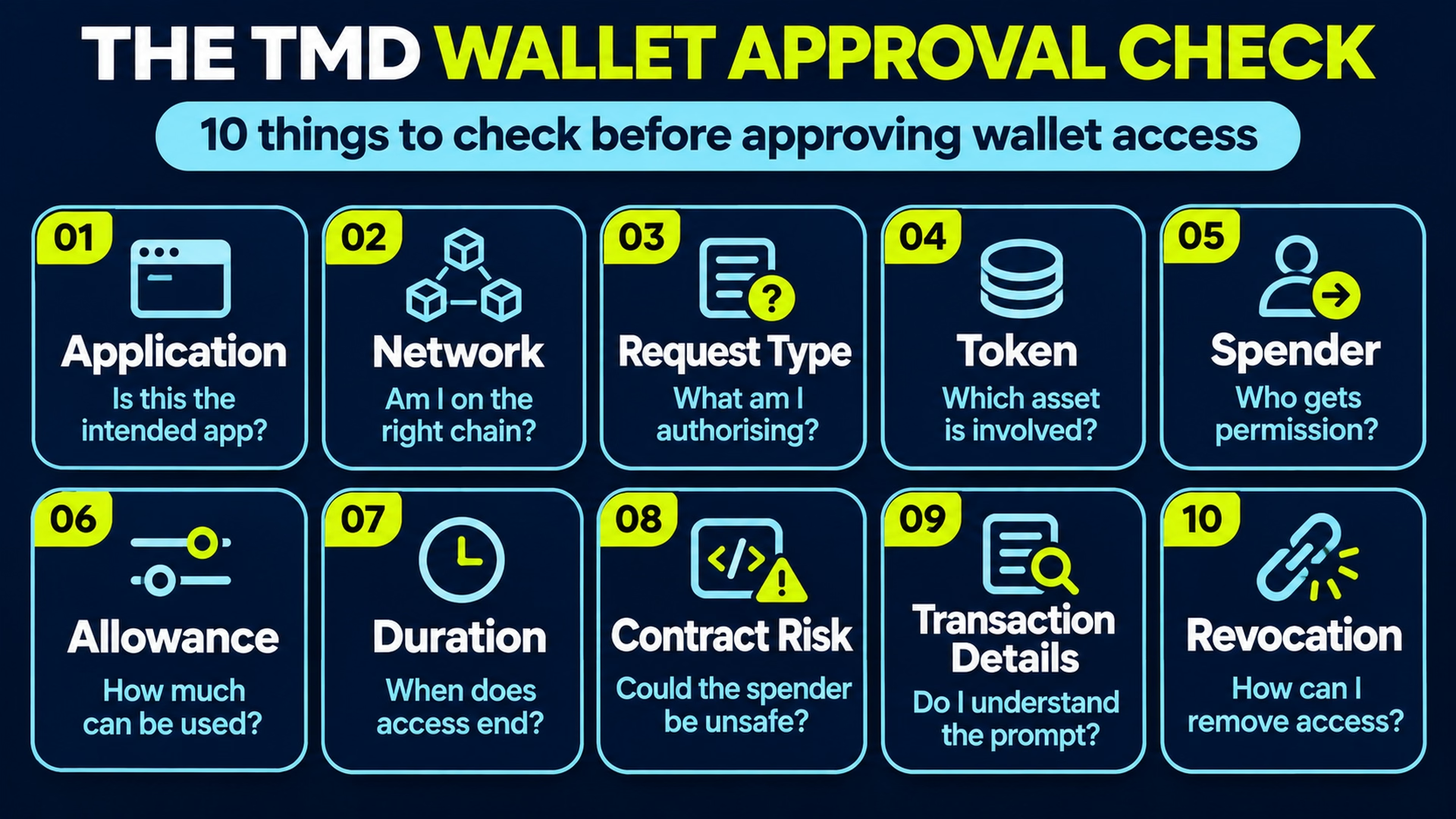
1. Application
Are you using the intended application and its genuine interface? Verify the website independently and be cautious with links from adverts, direct messages or unsolicited support accounts. A convincing design does not establish legitimacy.
2. Network
Check that your wallet is connected to the intended blockchain. Different networks can have separate tokens, contracts and permissions, even when an address looks identical. Do not assume a permission on one network applies to another.
3. Request Type
Identify whether the wallet is asking you to connect, sign a message, approve token spending or authorise a transaction. These actions have different consequences. Avoid proceeding if the request does not match the activity you intended.
4. Token
Which asset is involved in the permission request? Confirm the token and, where necessary, its contract address. Similar token names and symbols can be misleading, particularly on unfamiliar platforms.
5. Spender
Identify the address receiving permission to use the token. The spender may be a smart contract rather than the website itself. If the spender is unfamiliar, investigate its relationship with the application before approving.
6. Allowance
Review how much of the token the spender is being authorised to use. A limited allowance may restrict exposure compared with an unlimited approval. Consider whether the requested amount is appropriate for the intended action.
7. Duration
Check whether the permission has an expiration condition or may remain active until changed. Ordinary ERC-20 allowances generally do not expire automatically. A deadline on a permit signature should not be confused with an expiration date for the resulting allowance.
8. Contract Risk
Consider whether the approved spender could become unsafe through malicious behaviour, vulnerabilities or compromised controls. Legitimate projects can still encounter technical failures. No approval should be treated as risk-free solely because a contract has previously been used or audited.
9. Transaction Details
Read the information your wallet displays, including relevant amounts, addresses, permissions and fees. Be cautious when important details are missing or difficult to interpret. A clear wallet prompt can improve understanding, but it does not guarantee that the underlying contract is safe.
10. Revocation
Understand how the permission can be reviewed, reduced or removed later. The process depends on the network and authorisation mechanism, and on-chain changes may require fees. Consider whether you would still want the permission active after the intended activity is complete.
Completing every step of the TMD Wallet Approval Check does not guarantee that a transaction or protocol is safe. Its purpose is to help beginners understand the permissions they are granting and identify risks before authorising wallet actions.
What Should You Check Before Approving a Wallet Request?
Before confirming an unfamiliar wallet prompt, use this short checklist:
- I have verified the application and website.
- I am using the intended wallet and blockchain network.
- I understand whether this is a connection, signature, approval or transaction.
- I recognise the token involved.
- I understand who receives permission.
- I have reviewed the amount or allowance.
- The wallet prompt matches the action I intended.
- I understand how to review or revoke the permission where supported.
If important details remain unclear, do not rush to approve the request.
Common Wallet Approval Red Flags
Several warning signs deserve closer investigation before authorising wallet access.
An unfamiliar spender address: A permission may be directed to a contract or address unrelated to the service you intended to use.
Unexpected token access: An application that should not need a particular asset asks for permission to spend it.
Unexplained unlimited allowances: A broad approval is requested without a clear connection to the intended activity.
Fake verification requests: A website claims you must approve tokens or sign unusual messages to secure, unlock or verify your wallet.
Copied interfaces: A convincing imitation of a real dApp directs users towards fraudulent permission requests.
Unclear signing prompts: A website describes an action as harmless while the wallet displays complex permissions or unexpected contract interactions.
Recovery phrase requests: A website or supposed support representative asks for private keys or recovery words.
Artificial urgency: A message pressures you to approve immediately to avoid losing access, missing rewards or facing account restrictions.
These behaviours overlap with common crypto scams, including phishing, impersonation and fraudulent websites.
A suspicious request should be investigated rather than approved simply because it appears inside a familiar wallet.
Wallet Approval vs Wallet Security vs DeFi Safety
Crypto wallet approvals, general wallet security and DeFi safety are connected but distinct topics.
| Topic | Main focus | Typical questions |
|---|---|---|
| Wallet approvals | Permissions granted through wallet actions | What am I authorising? Who can spend the token? |
| Wallet security | Protecting wallet access and credentials | Are my keys safe? Could someone gain control of my wallet? |
| DeFi safety | Evaluating financial protocol and interaction risks | Could the protocol fail? Can I lose money without a hack? |
Someone can keep their private keys secure but still approve an unsafe spender.
Similarly, a user may manage token allowances carefully and still lose money through liquidation, asset-price changes or protocol failures.
Protecting private keys and seed phrases is therefore essential, but it does not replace reviewing token permissions or understanding financial risks.
These topics complement one another without describing the same security problem.
Beginner Safety Note
Crypto wallet approvals can remain active after a user stops using an application. Depending on the relevant token and permission mechanism, an authorised spender may be able to use approved tokens without receiving the wallet owner’s private key.
Always check the application, network, spender, amount and request type before authorising an action.
A hardware wallet can help protect signing keys, but it cannot guarantee safety if the user deliberately signs a harmful transaction or permission request.
Beginner Wallet Approval Terms to Know
| Term | Beginner meaning |
|---|---|
| Token approval | Permission authorising a specified spender to use eligible tokens under defined rules |
| Spender | An address authorised to use tokens through an allowance or other permission |
| Allowance | The amount a spender is permitted to use under a token contract |
| ERC-20 | A widely used Ethereum token standard that includes an allowance mechanism |
| Smart contract | Blockchain-based code that can execute defined functions |
| Signature | Cryptographic proof that a wallet account authorised a particular message or action |
| Permit | A signature-based mechanism that can authorise an allowance under supported standards |
| Nonce | A value used to distinguish authorised messages or transactions and help prevent replay |
| Revocation | The process of removing or reducing an existing permission |
| Gas fee | A network transaction fee for executing supported blockchain operations |
| dApp | A decentralised application that interacts with blockchain technology |
| Recovery phrase | Sensitive words that can be used to restore access to a wallet’s underlying keys |
These terms help explain what a wallet permission actually does and why its details matter.
Key Takeaways
- Wallet connections, signatures, token approvals and transactions are different actions. Their permissions and consequences should not be confused.
- Token allowances can let authorised spenders use specified assets later, even when a transfer does not happen immediately.
- Unlimited approvals offer convenience but can increase exposure if an authorised spender is malicious or compromised.
- Some signed messages carry meaningful financial authorisations. A signature should not automatically be treated as harmless because it does not immediately move tokens.
- Disconnecting a dApp does not automatically revoke token approvals. Existing allowances may require separate on-chain changes.
- The TMD Wallet Approval Check provides a practical way to evaluate requests, but no checklist can guarantee that an application or transaction is safe.
Where to Go Next
Understanding wallet approvals becomes easier when you know how wallets, smart contracts and decentralised financial applications work together. These related topics provide the broader context for recognising permission requests and managing risks.
Crypto Wallet Fundamentals
The way crypto wallets manage accounts, keys and transaction authorisation explains why a wallet can connect to an application without automatically granting token-spending permission. These fundamentals are useful before interacting with unfamiliar blockchain services.
Smart Contract Permissions
Token allowances rely on specific functions and rules implemented through smart contracts. Understanding how contracts execute transactions and manage access helps clarify why permissions may remain relevant after an initial interaction.
Understanding DeFi Risks
Wallet permissions are only one part of assessing decentralised financial activities. Broader DeFi safety involves evaluating protocol vulnerabilities, governance, dependencies, liquidity conditions and financial losses that can occur even when transactions work as intended.
Protecting Wallet Access
Managing approvals should complement broader crypto wallet safety practices, including protecting recovery phrases, checking transaction prompts and recognising suspicious applications. Secure credentials and carefully managed permissions address different aspects of wallet protection.
Recognising Wallet Scams
Fraudulent websites and impersonated support accounts often depend on convincing users to approve actions they do not understand. Recognising common crypto scams can help explain how deceptive interfaces, urgent messages and misleading wallet requests are used to target digital assets.
Safety Checklist
✓ Verify the website and network
✓ Identify the token and spender
✓ Understand the requested action
✓ Review the allowance amount
✓ Check for unusual or unreadable signatures
✓ Know how to review or revoke access

Disclaimer: This guide is for general information and education only. It is not financial, investment, legal, or tax advice. Crypto and digital assets can be risky, and prices may change quickly. Always do your own research and consider speaking with a qualified professional before making financial decisions.
The Meta Directory may earn commissions from some links, but this doesn’t influence our editorial content.

Author
Frequently Asked Questions
A crypto wallet approval is an authorisation associated with a wallet action. A token approval specifically allows a designated spender to use eligible tokens under the relevant contract’s rules, usually within an approved allowance. Other wallet actions, such as connections or ordinary message signatures, work differently.
No. Connecting a crypto wallet generally allows an application to interact with a selected wallet account, but does not automatically grant token-spending permission. Approving tokens involves a separate authorisation under the relevant token or permission mechanism.
Unlimited token approvals can increase risk because an authorised spender may be permitted to use more tokens than an individual transaction requires. They are not automatically malicious, but broad permissions can increase potential exposure if the spender is compromised or unsafe.
Wallet Permissions and Revocation
Yes, under certain conditions. If a smart contract has an effective token allowance, it may be able to transfer eligible tokens within that permission without requiring a fresh owner signature for every spending action. The token contract’s rules and remaining allowance determine what is permitted.
No, not automatically. Disconnecting a dApp usually ends or changes the wallet connection, while existing on-chain token allowances may remain active. Those permissions generally need to be reviewed and revoked separately if they are no longer required.
Yes, many token allowances can be reduced or revoked using supported wallet features or allowance-management tools. On-chain revocation may require a transaction fee. It does not reverse previous token transfers or automatically remove every other permission associated with the wallet.
HOW WE REVIEW & RANK
We research and compare platforms using a consistent framework: security signals, track record, product usability, feature quality, transparency of terms, and real-world usefulness.
When something changes – fees, policies, availability, or features – we update our listings and reviews.
Learn more about how we review platforms ->
STAY UPDATED
Get new crypto guides, updated rankings, and practical tips straight to your inbox — no spam, unsubscribe anytime.
NO SPAM. UNSUBSCRIBE ANYTIME.